Knot IQ - The Bear Essentials
- 5.0
- Rating
- 10.00K
- Installs
- $4.99
- Price

 Analysis by App-foxy
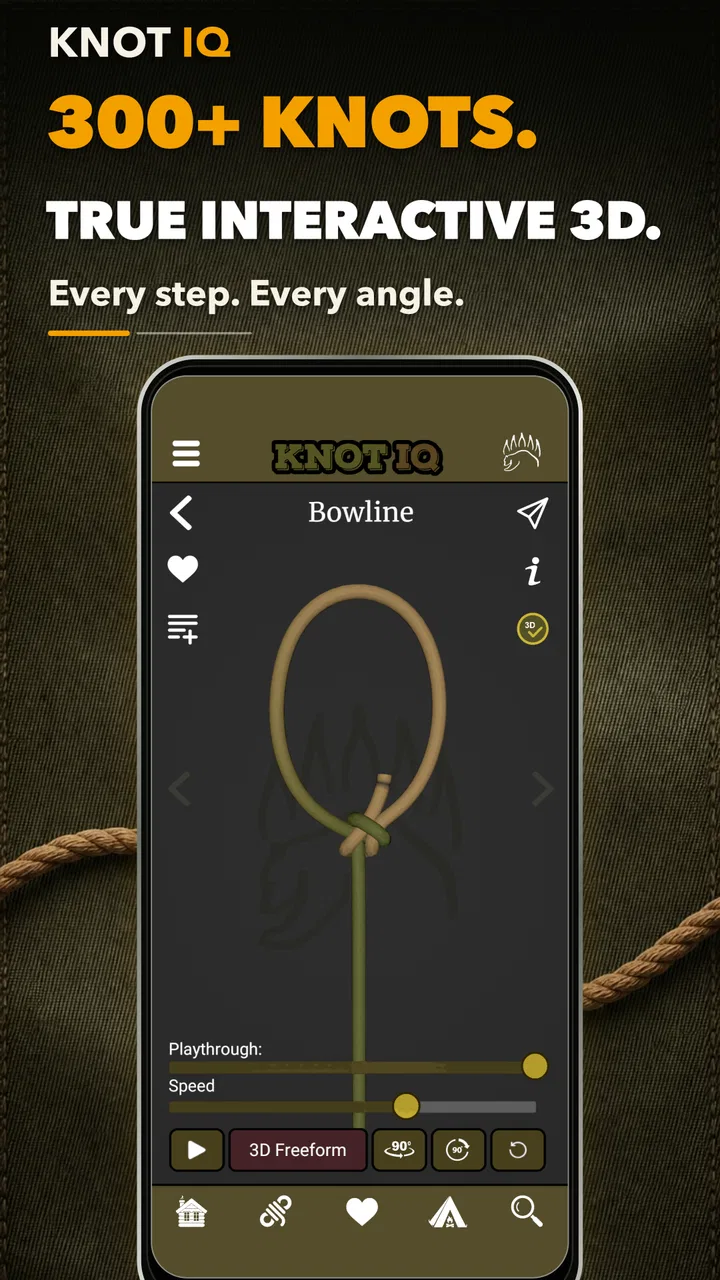
Learning knots from a static diagram is harder than it looks. A line can cross behind another line, a loop can rotate out of view, and one small mistake near the beginning can make the finished knot look almost right while weakening it completely. Knot IQ - The Bear Essentials takes a more practical approach by presenting knot tying in three dimensions and keeping the guide available offline. I found that combination especially useful when I wanted to study a knot away from a desk, where relying on a web page or video was inconvenient.
This is a paid Books & Reference app from The Bear Essentials Outdoors Co. LTD., priced at $4.99 and suitable for everyone. It is currently at version 3.8.1, works on Android 6.0 and later, and has built a strong response from its audience: a 5.0 average from around 500 ratings, with more than 10K installs. Those figures suggest a focused product rather than a huge general-purpose reference library, and that is exactly how it feels in use. It is aimed at people who want to understand knots visually, not simply collect a long list of names.
Why knot guides become difficult at the moment you need them
The hardest part of learning a knot is often not remembering its name. It is identifying which section of rope should move first, which part must stay loaded, and whether the working end passes in front of or behind the standing part. Ordinary illustrations can flatten all of those relationships into a confusing set of lines. A video may help, but pausing at the right instant is awkward, especially outdoors with wet hands or limited connectivity.
You May Also Like

 Blood Strike: 2.5 Anniversary
Blood Strike’s Loadouts Turn Every Drop Into a Tactical Gamble
A close look at Blood Strike’s custom loadouts: how fast access to signature weapons reshapes its battle royale rhythm, rewards preparation, and narrows the gap between fights.

 Pandora - Music & Podcasts
Pandora’s Music Is Easy to Start, but Harder to Recover
Pandora’s strength is its low-effort path from a seed to a station. Its weak spot is how much confidence it asks you to place in connection, setup, and quiet recovery.

 8 Ball Pool
8 Ball Pool Is Built on Rivalries, Rematches, and Routine
A close look at the rivalries, rematches, shared routines, and unanswered safety questions that turn a quick pool match into a persistent mobile community.

 Samsung Music
Samsung Music’s Quiet Strength Is Playing What You Already Own
Its reach comes less from spectacle than from dependable access to a personal library. That simplicity is both the app’s strongest retention engine and its ceiling.

 AccuWeather: Weather Radar
AccuWeather Review: A Quick, Clear Forecast for Everyday Decisions
For everyday plans, the best forecast is the one you can understand quickly. AccuWeather makes rain timing, radar, and local conditions easy to act on, with a few trade-offs.

 Hill Climb Racing
Why Hill Climb Racing Still Turns Crashes Into One More Run
A tiny car, a bumpy hill and one more upgrade: Hill Climb Racing keeps resurfacing because its simple chaos makes every near-miss feel personal.
More From Our News Desk
View All News


The three-dimensional presentation is the most important reason to consider this app. I could mentally turn the knot rather than trying to decode a single fixed drawing. That matters when two strands overlap in a conventional illustration. Instead of guessing which line is hidden, I could inspect the shape and follow the route more deliberately.
The offline design also changes when the app becomes useful. It is not only a study tool for a quiet evening. It makes sense as something to check before a camping trip, while preparing boating equipment, or during a practice session in a place where reception is unreliable. I would still learn the basic sequence before depending on any knot in a safety-sensitive situation, but having a visual reference stored locally is more reassuring than hoping a search result loads at the right time.
Where users may get stuck is expecting the app to replace physical practice. A model can show the path of the rope, but it cannot tell whether your cord is too stiff, whether you have dressed the knot neatly, or whether you are applying the correct tension. I treated each guide as a teaching aid: watch the movement, copy it slowly, then inspect the result with my hands. That extra step is essential.
What the three-dimensional view actually helps with
A 3D model is most valuable during the middle of a knot, not just at the finished stage. The beginning is usually easy to imitate, and the final shape can often be recognized from a picture. The confusing part is the transition between them. When the rope folds over itself, a rotatable view helps clarify whether the working end should travel around the outside or through the center.
My practical tip is to stop after every major change in direction. I compare the model with my rope before pulling anything tight. Tightening too soon hides the mistake and forces a complete restart. This slower method may feel inefficient, but it is faster than repeatedly tying a nearly correct version and never discovering where the error began.
The app is also useful for learning the difference between a knot that merely resembles the target and one that has been dressed properly. A tidy final shape gives you a reference for spacing and alignment. That does not turn the application into a testing device, but it encourages a better habit: finish the structure first, then set the knot with controlled tension instead of yanking on every strand.
Setup checks before blaming the guide
Because this is an offline reference, I would prepare it before leaving home rather than waiting until a trailhead or dock. Open the app while you still have a reliable connection, move through the material you expect to use, and make sure the relevant guide is accessible when the device is disconnected. This is a simple check, but it avoids discovering too late that your first outdoor session is also your first real test.
It is worth checking the device itself as well. The minimum operating system is Android 6.0, so older phones may be the first source of trouble. On a compatible device, close other applications if the model feels sluggish, keep the screen awake long enough to follow a sequence, and position the phone where both hands can work without repeatedly touching the display. These are ordinary setup choices, but they make a surprisingly large difference when copying a knot.
I would also download or update the app before a trip, not during one. An update can be useful, but changing the app immediately before relying on it introduces an avoidable variable. The current version is 3.8.1, and keeping the installation current is sensible; the practical point is to test the version you plan to use while you still have time to adjust your workflow.
Screen visibility deserves attention. A dark display, strong glare, or a phone lying flat on a picnic table can make a three-dimensional model harder to read than a printed card. I got better results by placing the phone slightly upright and keeping the rope close to the same orientation as the on-screen model. If a strand seems to disappear, rotating the model and changing the phone angle is usually more productive than repeatedly zooming in mentally.
A recovery method when your knot no longer matches
When a tied knot stops resembling the model, I recommend returning to the last unmistakable stage instead of trying to repair the final tangle. Loosen the rope only enough to expose the previous crossing, compare that crossing with the three-dimensional guide, and continue from there. If the rope has been pulled extremely tight, starting again is often quicker and produces a cleaner result.
Use a contrasting rope if possible. A single-color cord can make two adjacent sections blend together, while different lighting can create shadows that look like extra crossings. A bright, flexible practice rope makes the visual comparison easier. This is not a special requirement of the application; it is a way to get more value from the model and reduce errors caused by the physical material.
Another useful technique is to keep the standing part under light tension while moving the working end. Too much tension locks the rope before the sequence is complete, but no tension at all lets the structure collapse. The app can show the intended path, while your fingers provide the stability that the screen cannot. I found that this balance made the guide feel clearer than simply copying each movement at full speed.
If the model seems to jump or the view becomes confusing, pause your own movement first. Rotate the virtual knot back to a familiar angle, identify the standing part and working end, and then resume. Trying to match a moving screen while your rope is also moving creates two sources of confusion. The best workflow is deliberate: inspect, perform one action, stop, and compare.
When the problem is really the rope, phone, or environment
Not every frustrating session points to an app problem. Rope diameter, stiffness, moisture, and surface texture all affect how easily a knot forms. A knot that looks simple in the guide may be difficult with a thick braided line, while a slippery cord may collapse before you can dress it. If the same sequence works with a different piece of rope, the material is the likely explanation rather than the visual guide.
The phone can create its own obstacles. A small screen makes overlapping strands harder to distinguish, and a greasy or wet display can interfere with gestures. If the view is difficult to control, clean and dry the screen, stabilize the phone, and use short, intentional movements. I would not practice a complicated knot for the first time while wearing bulky gloves or standing in a moving boat; learn the hand sequence in a controlled setting, then repeat it in the real environment.
Offline access is a strength, but it should not be confused with every kind of independence. You still need enough battery to use the screen, enough light to see the rope, and enough preparation to know which reference you want. A saved guide cannot solve a dead phone or a rushed decision. For safety-critical applications, I would carry a second reference and rely on established training rather than treating any app as the sole authority.
The Everyone age rating makes the app approachable for families and beginners, but younger users still need supervision around rope, water, climbing equipment, or any situation where a poorly tied knot could have serious consequences. The simple interface concept does not remove the need for judgment. I see it as a learning companion, not a certification of knot strength or a substitute for instruction from an experienced person.
How it compares with videos, web searches, and printed cards
Video tutorials are often better when you need to see a complete hand movement, including how the rope is held and how tension is applied. They can also provide spoken explanations and practical warnings. Their weakness is that they depend on finding a suitable video, scrubbing to the right moment, and keeping playback visible while both hands are occupied. Knot IQ is more focused: its three-dimensional model is easier to inspect from different angles, and its offline approach is better suited to quick reference away from a connection.
Web searches are convenient when you do not know the name of a knot. They offer breadth, but the quality and clarity of results vary, and a page may be difficult to use outdoors. This app makes more sense once you want a dedicated knot reference rather than a general search tool. If your main need is discovering many unrelated outdoor topics, a broader reference source will be more flexible.
Printed knot cards remain useful because they never run out of battery and can be glanced at without handling a phone. They are also easy to keep in a dry bag. Their limitation is fixed perspective. A card may show the finished knot and a few arrows, but it cannot offer the same sense of turning the structure around. My preferred arrangement is not strictly either-or: use the app for learning the sequence, then keep a compact printed reminder for situations where device use is inconvenient.
The $4.99 price is reasonable for someone who expects to return to a dedicated visual guide, particularly if offline access is central to the decision. It is less compelling for a casual user who needs one familiar knot once and can learn it from a free lesson. The purchase makes the most sense when the app becomes part of regular preparation rather than a one-time curiosity.
Who will get the most from this app
I would recommend it to campers, hikers, anglers, boat users, scouts, outdoor educators, and anyone who learns better by manipulating a shape than by reading a paragraph. It is also a good fit for a beginner who feels that conventional diagrams are too abstract. The visual approach gives you something concrete to imitate, while offline availability removes one common obstacle during outdoor practice.
A realistic everyday scenario would be preparing a tarp before a weekend trip. At home, I would open the guide, place a short practice rope beside the phone, and repeat the sequence until I could identify the important crossings without rushing. At the campsite, I could consult the same reference if I forgot the order, then tie the actual line slowly and inspect the finished structure before loading it. That workflow uses the app where it is strongest: as a memory aid and visual checkpoint.
I would be more cautious about recommending it to someone who wants detailed engineering guidance, load ratings, rescue instruction, or professional rigging procedures. A knot reference can show form, but safe use depends on the rope, the application, the forces involved, and the user’s training. Those readers should choose a specialist course or authoritative technical manual alongside any visual app.
It may also be the wrong choice if you strongly prefer narrated demonstrations, need a broad outdoor encyclopedia, or want an entirely paper-based kit. The focused design is a benefit for knot practice, but focus also means it is not a replacement for every kind of reference material. Knowing that trade-off before paying is more useful than assuming a high rating guarantees a perfect match for every learner.
My practical verdict after using it as a learning aid
What I like most is the way the three-dimensional presentation addresses the exact point where knot diagrams usually fail: the hidden relationship between strands. Offline access adds real value rather than sounding like a decorative feature, because knot practice often happens in places where connectivity is inconvenient. The app is compact in purpose, easy to carry, and suitable for repeated practice sessions.
Its limitations are equally clear. It cannot judge your rope choice, tension, dressing, or final safety. A phone screen is still less tactile than a teacher’s hands, and beginners may need to slow the guide down mentally by stopping after each crossing. The best results come from pairing the app with suitable practice rope, good lighting, and a habit of checking each stage before tightening.
The strong 5.0 average and the audience of more than 10K installs make it look encouraging, but I would base the buying decision on the workflow rather than the rating alone. If you want a dedicated, offline, three-dimensional knot reference and expect to practice more than once, the $4.99 cost feels justified. If you need only a single basic knot, prefer spoken video instruction, or require professional safety documentation, another resource may serve you better.
For me, Knot IQ - The Bear Essentials works best as a calm preparation tool: open it before the trip, learn the path with a spare rope, and use it later as a visual reminder rather than an emergency substitute for knowledge. That is a realistic role, and within it the app is genuinely useful. Its biggest strength is not the number of knots or the novelty of a model; it is making the confusing middle of a knot easier to see.
FAQs for Knot IQ - The Bear Essentials
01What is Knot IQ - The Bear Essentials?
Knot IQ - The Bear Essentials is an educational and reference app focused on knot tying. It is designed to help users learn, practice, and remember useful knots through guided explanations and visual instructions. The app may appeal to campers, hikers, anglers, boaters, scouts, and anyone who wants a practical introduction to essential knots without relying on a physical handbook.
02Is Knot IQ - The Bear Essentials suitable for beginners?
Yes, the app is intended to be approachable for beginners who have little or no previous knot-tying experience. Its step-by-step presentation makes it easier to follow the order of each movement, while visual guidance can help users compare their own attempts with the expected result. However, beginners should practice slowly with suitable rope and verify that a knot is secure before using it for climbing, rescue, towing, or other safety-critical purposes.
03What types of knots can I learn with the app?
Knot IQ - The Bear Essentials focuses on essential practical knots rather than treating knot tying as a purely theoretical subject. Depending on the version and available content, users can expect guidance for common categories such as loops, bends, hitches, and binding knots. The exact selection may vary by platform or update, so it is worth checking the current app listing before downloading if you need a particular knot.
04Does the app work without an internet connection?
The instructional content may be available for offline use after the app has been installed, which is useful when camping, hiking, boating, or practicing somewhere with limited reception. Nevertheless, some functions—such as downloading additional material, displaying advertisements, synchronizing data, or accessing external links—could require an internet connection. Users should open the lessons once while online if they plan to rely on the app away from mobile coverage.
05Can I rely on Knot IQ for climbing, rescue, or other dangerous activities?
The app can be a helpful learning aid, but it should not be considered a substitute for certified instruction, supervised practice, or official safety procedures. A knot that looks correct may still be tied incorrectly, loaded in the wrong direction, or unsuitable for a specific task. Never use information from the app alone for climbing, rescue work, lifting, or life-support applications without professional training and independent safety checks.
Pros
- Simple knot tutorials are useful for beginners and occasional outdoor users.
- Clear visual guidance makes each tying step easy to follow.
- Covers practical knots for camping
- boating
- fishing
- and everyday tasks.
- Helpful reference when you need to recall a knot away from internet access.
- Compact design makes it convenient to keep on a phone during outdoor trips.
Cons
- The app focuses on knots
- so its usefulness is limited outside specific activities.
- Some users may need more detailed explanations for complex knot variations.
- Knot terminology can still be confusing for complete beginners.
- The visual presentation may feel dated compared with newer tutorial apps.
- It may not replace hands-on practice with real rope and different materials.

Knot IQ - The Bear Essentials
Gallery